Choose n8n if you're building AI agents that need real logic, high volume or data kept on your own server. Choose Make if a non-technical team needs to connect apps quickly. Choose GoHighLevel if what's actually missing is a CRM that follows up, books and calls leads for you. Plenty of Australian businesses end up running two of them side by side.
The n8n vs Make debate gets most of the attention, but these three tools aren't really competing for the same job. n8n and Make are AI workflow automation tools. They sit between the apps you already pay for and move data, decisions and AI calls between them. GoHighLevel is a CRM and marketing platform with its own automation built in. So the useful question isn't "which one is best?" It's "which job am I hiring this tool to do?"
We build AI voice agents and the workflows behind them on all three platforms, so this comparison comes from the build side rather than the feature pages. It covers what matters for AI work: agents, integrations, hosting, billing and how long your team will take to get competent.
n8n vs Make vs GoHighLevel: side-by-side comparison
The difference that bites first is what each platform charges for. n8n bills per workflow run, Make bills per step, and GoHighLevel bills a flat subscription plus usage. That one detail shapes cost more than any feature list.
| n8n | Make | GoHighLevel | |
|---|---|---|---|
| What it is | Workflow automation platform, source-available | Cloud no-code automation platform | CRM and marketing platform with built-in automation |
| AI features | AI Agent node with tool calling, memory, vector stores and RAG; works with any major model or a local one; MCP support | AI Agents inside scenarios, Maia build assistant, AI modules; Make's AI provider or your own API keys | Voice AI, Conversation AI, Workflow AI Builder (plain-English prompts), Decision Maker and Intent Detection actions |
| Integrations | Hundreds of built-in nodes plus community nodes; the HTTP Request node reaches any REST API | 3,000+ native apps; custom apps for any public API | CRM, calendars, SMS, email, phone and reviews built in; outside tools mostly via webhooks |
| Self-hosting | Yes, free Community Edition | No. Cloud only, US or EU data zones | No. Hosted SaaS only |
| Learning curve | Steep. You'll work with JSON and expressions | Moderate. Visual, but data mapping takes practice | Gentle for sales and marketing teams |
| Billing model | Executions: one full workflow run, however many steps it has | Credits: most module actions cost 1, AI steps can cost more | Subscription plus usage charges for phone, SMS and AI minutes |
| Best use case | Custom AI agents, high-volume or data-sensitive workflows | Connecting apps quickly without a developer | Lead capture, follow-up, booking and pipelines in one place |
Which tool is best for which job?
n8n: best for custom AI agents and data you want to keep close
n8n is the one to reach for when an AI step has to make decisions, call tools and act across several systems. Its AI Agent node lets a model pick its next move at run time: look up a CRM record, check a calendar, search a knowledge base. It doesn't have to follow a fixed path. And because a run that touches 25 nodes still counts as one execution, AI agents don't get dearer as they get smarter.
The second reason is hosting. The Community Edition is free to self-host, so you can run it in an Australian cloud region and keep call transcripts and customer records onshore. For businesses handling personal information under the Privacy Act, that's a simpler story to tell than an offshore data trail. It's also the usual base for custom AI architecture such as private RAG pipelines.
One licence detail: the Community Edition runs under n8n's Sustainable Use License. Running your own business on it is fine, and so is having an agency build and maintain workflows for you. Giving your own customers a login to build workflows on your instance is not.
Skip it if nobody on your team, or your build partner's, is comfortable with JSON, webhooks and keeping a server patched.
Make: best for visual, no-code automation
Make suits teams that think in flowcharts. You drop modules onto a canvas, join them up and watch data move through each step, which makes no-code automation approachable for an ops manager or marketer. Routers split a scenario into separate paths and cost no credits. With 3,000+ native apps, the connector you need usually exists already.
The catch is the meter. Most module actions use a credit, and a scheduled trigger uses one every time it checks for new data, even when it finds nothing. A trigger polling every five minutes burns about 8,640 credits a month on its own (12 checks an hour, all day, every day). Use instant webhook triggers wherever the app offers them.
Make's AI Agents handle classify-and-route jobs well: read an enquiry, tag it, draft a reply. Multi-step reasoning across several systems is where you'll hit the edges sooner than in n8n. Make also hosts only in US and EU data zones, so Australian customer data leaves the country by default.
Skip it if your workflows will run thousands of times a month with many steps each, or the data has to stay onshore.
GoHighLevel: best for sales and marketing automation
GoHighLevel is a different animal. It's a CRM, pipeline, calendar, SMS and email platform, phone system and review manager under one login, with GoHighLevel automation running underneath. If your real problem is leads going cold because nobody follows up, it fixes that out of the box. Its Workflow AI Builder drafts a workflow from a plain-English prompt, and its Voice AI agents answer inbound calls, make outbound calls and book appointments straight into the calendar.
The costs come in layers. Voice AI sits on top of the core platform as an AI Employee add-on per sub-account, either with a monthly minute allowance or unlimited under a fair-use policy. Phone charges are billed separately either way.
Its weak spot is the world outside GoHighLevel. Connecting a tool it doesn't support natively means webhooks and field mapping, and heavy data transformation gets clumsy. That's usually the point where n8n or Make gets added behind it.
Skip it if you already have a CRM your team likes and you only need your apps to talk to each other.
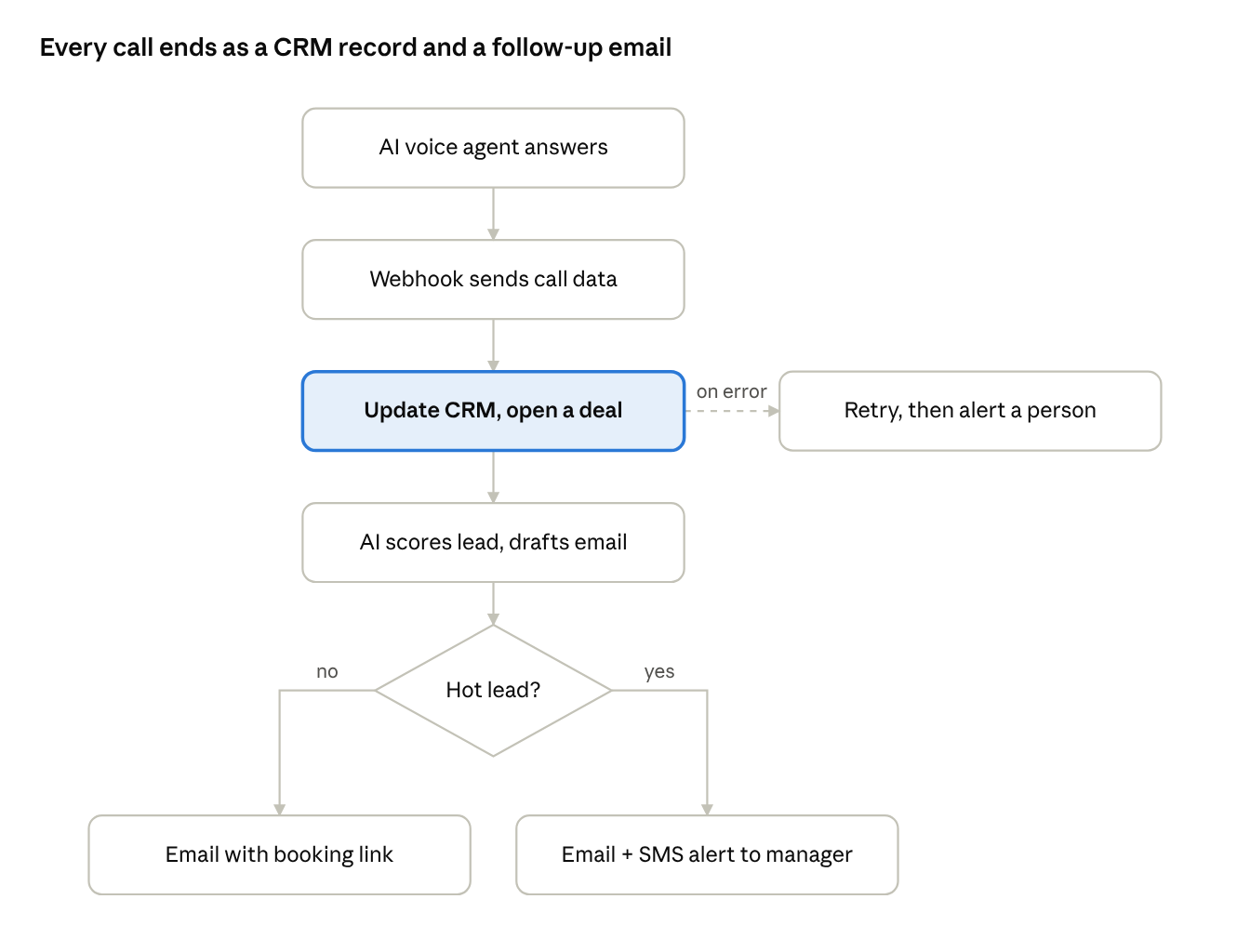
Example AI workflow: inbound call to CRM to follow-up email
Feature tables only go so far, so here's one real job built three ways. It's the after-hours enquiry that has to land in the CRM and get a reply before the caller rings a competitor, the classic speed to lead problem.
A landlord rings a Melbourne property management agency at 7:40pm to ask about fees for a two-bedroom unit in Brunswick. Here's what should happen next:
• The AI voice agent answers. It confirms the caller's name, mobile, email, suburb, property size, current manager and timing. It answers fee questions from an approved script and offers a callback time.
• The call ends and a webhook fires. The voice platform sends the transcript, a summary and the structured fields to your automation layer.
• The workflow checks the CRM. It searches by mobile and email so a returning landlord doesn't become a duplicate, then creates or updates the contact and opens a deal in the right pipeline stage.
• AI scores and drafts. A model rates the lead as hot, warm or nurture against rules you set, and writes a short personal opening for the follow-up email. The rest is an approved template, so fees and terms are never improvised.
• The follow-up goes out. The email arrives within minutes with a booking link. Hot leads also trigger an SMS or Slack alert to the business development manager.
• Failures get caught. If the CRM times out, the workflow retries and alerts a person instead of quietly dropping the lead.
How each tool builds it
GoHighLevel. If GoHighLevel's own Voice AI takes the call, steps 1 to 5 live in one system. The agent writes to contact fields, a workflow fires when the call ends, and email, SMS and the pipeline are all native. It's the quickest to stand up. At 1,000 calls a month averaging three minutes, you'd need the Unlimited AI Employee plan plus phone charges, because the Growth plan's 100 minutes would be gone in about a day. If your voice agent runs on a dedicated platform instead, GoHighLevel receives the call data through an inbound webhook and you map every field by hand.
Make. A Custom Webhook trigger receives the call data, a Router splits the hot, warm and nurture paths, CRM modules search and update the contact, an AI module drafts the opening line and a Gmail or Outlook module sends it. That's roughly seven or eight credits per call, so 1,000 calls a month fits inside the Core plan's 10,000-credit allowance. Add the model's token bill if you use your own OpenAI or Anthropic key. Error-handler routes cover step 6 and use no credits.
n8n. A Webhook node receives the call, a CRM node (HubSpot, Pipedrive and Zoho are built in) handles the lookup and update, and an AI Agent node scores the lead and drafts the email, with CRM and calendar lookups available as tools. An Error Trigger workflow covers step 6. Each call is one execution: 1,000 calls is 1,000 executions, inside n8n Cloud Starter's 2,500, or uncapped if you self-host in an Australian region.
For most Australian businesses we'd suggest a dedicated voice agent, n8n or Make in the middle, and whichever CRM your team already lives in. We'll connect it to your CRM rather than make you switch. If there's no CRM yet, GoHighLevel often becomes it. Curious about the voice layer itself? Here's how voice agents work under the hood.
Honest pros and cons
n8n
Pros
• Billing doesn't punish long workflows: one run is one execution, however many steps it has.
• Self-hosting gives you control over where data lives and removes the execution cap.
• The deepest AI agent tooling of the three: tools, memory, vector stores and your choice of model.
• A Code node for the moments when visual building runs out.
Cons
• The steepest learning curve. Most business owners will want a technical partner.
• Self-hosting means you own updates, backups, uptime and security.
• No CRM, phone or SMS of its own. It connects to those tools; it doesn't replace them.
• Cloud plans cap monthly executions (2,500 on Starter), and a busy polling workflow eats them quickly.
Make
Pros
• The fastest route from idea to working automation for non-developers.
• 3,000+ native apps, plus custom apps for anything with a public API.
• Visual scenarios are easy to hand over, explain and debug.
• The free plan's 1,000 credits are enough to prototype properly.
Cons
• Credits add up: most actions cost one, including polling checks that find nothing.
• AI steps on Make's own AI provider can cost several credits each, depending on the model and tokens.
• No self-hosting, and data zones are US and EU only.
• Large scenarios with branches that need to rejoin get hard to read and maintain.
GoHighLevel
Pros
• CRM, pipelines, calendars, SMS, email, phone and reviews in one login.
• Native Voice AI and Conversation AI that write straight into contact records.
• Workflow AI Builder turns a plain-English description into a starting workflow.
• Sub-accounts suit agencies and multi-location businesses.
Cons
• The weakest of the three at talking to outside systems.
• Usage charges stack on the subscription: phone, SMS, AI minutes, and per-run AI workflow actions such as Decision Maker.
• It's a walled garden. Moving out later is real work.
• Voice AI handles scripts, qualification and bookings well; complex call logic is easier on a dedicated voice platform.
Whichever way you learn, map the process first. Automating a messy follow-up process only produces mess faster.
So which is the best automation platform for you?
There's no single best automation platform, and n8n vs Make is rarely the right first question. Start with the problem, not the tool:
• Leads slip through because nobody follows up fast enough? Start with GoHighLevel, or put an AI voice agent in front of the CRM you already have.
• Your apps don't talk to each other and nobody on the team codes? Start with Make.
• You need AI that reasons across systems, runs at volume or keeps data in Australia? Start with n8n.
If you're replacing fixed-rule automation that breaks whenever a customer says something unexpected, that's your cue to add an AI layer, whichever platform carries it. The pairing we recommend most often is GoHighLevel at the front for customer conversations, with n8n behind it doing the heavier lifting.
AI Squad designs and builds this kind of workflow automation for businesses in Melbourne, Sydney, Brisbane and Perth. Book a free workflow audit and we'll map your call-to-CRM process and tell you which platform fits. Or call our demo agent to hear the front end in action.